The Multitasking Myth at Your Desk
The multitasking myth at your desk: tell parallel work from task switching, then shape a work session that feels calmer and leaves clearer progress.
You are halfway through an email when a spreadsheet notification appears, so you open it, answer a chat, then return to the email and reread the last sentence. The multitasking myth at your desk begins in moments like this: several tasks can be in motion, but your attention often serves them one at a time.
That distinction matters because a busy screen can disguise a stop-start session. The useful question is not whether you can keep several things open, but which tasks truly need attention at the same moment and which merely compete for it.
Parallel work, briefly
Some work really can happen concurrently. A file may export while you draft a note; a long download can run while you review a printed agenda. In these cases, one task proceeds without demanding your attention while you actively do another.
Call this background work rather than a special talent for juggling. The export does not need you to watch its progress. The agenda does need your eyes and judgement. Keeping the background process running may be sensible, provided its alerts do not keep pulling you away.
There are also tasks that share attention naturally. You might listen to a familiar instrumental track while sorting papers, or talk with a colleague while walking together. But if both activities require precise recall, careful wording or rapid decisions, the apparent overlap can be misleading. Conversation may continue while your mind loses a detail from the document.
A quick test: if one activity can continue safely and usefully without your attention, it can probably run in the background. If it needs you to notice, interpret or decide, treat it as active work.
The switching toll
Switching is the movement from one task’s rules to another’s. An email asks you to interpret someone else’s request; a budget sheet asks you to track figures and relationships; a message thread may ask for a quick social response. Each switch means retrieving the new task’s context, not merely changing windows.
That context has loose ends. You may need to recall what you were trying to say, which row you were checking, or what the other person asked for. When you return, there can be a small pause while you reconstruct the thread. Repeating that pause makes a session feel fragmented, even if each interruption seems brief.
The cost is easy to miss because the activity looks productive. Your hands keep moving, notifications get cleared and browser tabs change. Yet visible motion is not the same as completed work. A day can feel packed with responses while the document that needed careful thought remains untouched.
Notice how often you must reread or retrace before continuing. That is a more useful signal than the number of open tabs.
Why busy feels busy
Task switching produces plenty of small beginnings: open the file, scan the message, start a reply, return to the file. Beginnings are visible and easy to count. The harder part—holding a question in mind, comparing options or shaping a complete draft—can produce little to show for several minutes.
There is also a difference between being occupied and making progress. Clearing a notification may remove one prompt, but it may also create a new thread to remember. A long chain of little responses can leave you with a strong sense of effort and a weak sense of what is finished.
Imagine you have a report due for internal review and a chat window pinging beside it. You pause after each paragraph to answer the newest message. If you instead silence that chat for a chosen stretch and leave it open for later, you may complete a coherent section before checking in. The expected result is visible: a section ready for review, rather than several half-formed replies and a report that still needs its central point.
Try judging the session by an observable piece of work: a paragraph drafted, a set of figures checked, or a decision recorded. That gives your attention somewhere concrete to return.
Desk-side field notes
Small changes to the desk can make interruptions less automatic. The aim is not to create a perfect workspace; it is to make the current task easier to resume and competing tasks less likely to demand a response.
- Keep one active document in front. Minimise unrelated windows or move them to another desktop. Leave background processes running only if they do not need supervision.
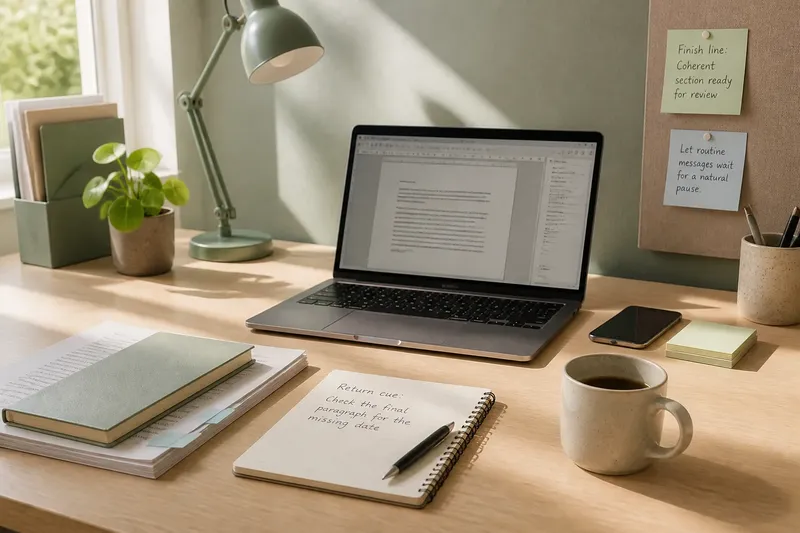
- Write a return cue. Before handling a necessary interruption, add a short note such as “check the final paragraph for the missing date”. This gives you a precise place to restart.
- Collect low-urgency messages. Let routine email or chat wait until a natural pause, rather than letting each alert choose the next task for you.
- Separate reference from action. Keep the source document visible when you are drafting from it, but close material you are not using. Extra context can become extra temptation.
- Choose a small finish line. Decide what a useful unit of work looks like before you begin: a reply sent, a section shaped, or a set of questions answered.
- Use a holding note for side thoughts. If another task comes to mind, jot it down rather than opening it immediately. Return to the note when you have reached a stopping point.
These are adjustments to attention, not rules for every kind of job. A role that depends on live coordination may need frequent responses; the practical aim is to make those responses deliberate rather than reflexive.
When overlap helps
There is no need to force every task into a solitary queue. Some pairings are sensible because one activity is genuinely passive, routine or compatible with the other. Waiting for a file to save while arranging tomorrow’s materials can use otherwise idle time. Listening to a familiar recording while doing a simple, repeatable chore may also feel natural.
Be more cautious when both tasks demand language, memory or judgement. Drafting a sensitive message while following a meeting is a poor pairing: each can alter what you notice in the other. Likewise, switching between two complex documents may be harder than alternating between a demanding task and a simple physical reset.
Think about the cost of a missed detail, too. If overlooking an alert or a line of text could cause a serious problem, give that work its own attention and follow the relevant workplace procedures. For ordinary desk work, a quiet pause is often less costly than repeatedly rebuilding the context you just left.
How can you tell?
Is music multitasking?
It depends on the work and the music. Familiar instrumental music may sit in the background during routine tasks, while lyrics or an unfamiliar track can compete with reading and writing.
Should notifications be turned off?
Mute or defer alerts that are not time-sensitive if your role allows it. Keep the channel you need for urgent coordination available, and use your team’s agreed method for urgent contact.
What if several tasks are urgent?
Clarify which deadline or consequence takes priority, and tell the relevant people what you can handle first. If the demands genuinely conflict, ask a manager or colleague to help resolve the order rather than pretending all can receive full attention at once.
Can switching ever be useful?
Yes: a deliberate change can provide a pause when you are stuck, or let a background process finish. The useful distinction is between choosing a switch for a reason and being pulled away by every new prompt.
Make the session legible
Before starting, name the task you are actively doing and the small piece that would count as progress. Decide which incoming requests can wait, and leave a return cue if you expect an interruption. When you stop, record what remains so the next session begins with context rather than guesswork.
The multitasking myth at your desk is not that two things can never happen together. It is that several demanding tasks can all receive full attention simply because they share a screen or an hour. Let background work run, give active work a clear turn, and make the finished piece easy to see.
A calmer desk is not necessarily a silent one. It is a desk where you can tell what deserves your attention now—and where to pick up when that attention has to move.